gh-ost 源码阅读
地址:
- https://github.com/github/gh-ost/tree/master/go
- https://deepwiki.com/github/gh-ost
目录结构
├── base
│   ├── context_test.go
│   ├── context.go
│   ├── default_logger.go
│   ├── load_map_test.go
│   ├── load_map.go
│   ├── utils_test.go
│   └── utils.go
├── binlog
│   ├── binlog_dml_event.go
│   ├── binlog_entry.go
│   ├── binlog_reader.go
│   ├── gomysql_reader.go
│   └── testdata
│       ├── mysql-bin.000066
│       ├── mysql-bin.000070
│       ├── rbr-sample-0.txt
│       ├── rbr-sample-1.txt
│       └── rbr-sample-2.txt
├── cmd
│   └── gh-ost
│       └── main.go
├── logic
│   ├── applier_test.go
│   ├── applier.go
│   ├── hooks_test.go
│   ├── hooks.go
│   ├── inspect_test.go
│   ├── inspect.go
│   ├── migrator_test.go
│   ├── migrator.go
│   ├── server_test.go
│   ├── server.go
│   ├── streamer_test.go
│   ├── streamer.go
│   ├── test_utils.go
│   └── throttler.go
├── mysql
│   ├── binlog_test.go
│   ├── binlog.go
│   ├── connection_test.go
│   ├── connection.go
│   ├── instance_key_map.go
│   ├── instance_key_test.go
│   ├── instance_key.go
│   ├── replica_terminology_map.go
│   └── utils.go
└── sql
    ├── builder_test.go
    ├── builder.go
    ├── encoding.go
    ├── parser_test.go
    ├── parser.go
    ├── types_test.go
    └── types.go

9 directories, 47 files
入口 cmd/gh-ost/main.go
func main(){
	migrationContext := base.NewMigrationContext()
	//...
	log.Infof("starting gh-ost %+v (git commit: %s)", AppVersion, GitCommit)
	acceptSignals(migrationContext)

	migrator := logic.NewMigrator(migrationContext, AppVersion)
	if err := migrator.Migrate(); err != nil {
		migrator.ExecOnFailureHook()
		migrationContext.Log.Fatale(err)
	}
	fmt.Fprintln(os.Stdout, "# Done")
}
- 新建上下文
- 设置参数
- 接受信号、信号处理
- 新建 Migrator
- 执行
核心逻辑
// Migrate executes the complete migration logic. This is the major gh-ost function. func (this *Migrator) Migrate() (err error)
- go this.listenOnPanicAbort() // 监听 panic
- 「HOOK」this.hooksExecutor.onStartup()
- 「Parser」「SQL」this.parser.ParseAlterStatement
- 「SQL」this.validateAlterStatement()
- defer this.teardown() // After this point, we’ll need to teardown anything that’s been started so we don’t leave things hanging around
- 「INIT」初始化组件
- 「Inspector」initiateInspector
- 「Streamer」initiateStreaming
- 「Applier」initiateApplier
- createFlagFiles
- 尝试 instant online ddl ,可以执行的的话就直接执行返回了
- 「Inspector」this.inspector.getReplicationLag()
- 「Inspector」this.inspector.inspectOriginalAndGhostTables() 检查原始表和幽灵表以查看迁移是否有意义和有效
- 「Applier」this.applier.prepareQueries()
- 「HOOK」this.hooksExecutor.onValidated()
- 「INIT」「Server」this.initiateServer()
- 「Server」defer this.server.RemoveSocketFile()
- this.countTableRows() 获取表行数
- this.addDMLEventsListener() 增加 DML 事件监听
- this.applier.ReadMigrationRangeValues() 拷贝范围(最大值最小值)
- 「INIT」「Throttler」 this.initiateThrottler()
- 「HOOK」this.hooksExecutor.onBeforeRowCopy()
- go this.executeWriteFuncs() 通过
applier写入rowcopy和backlog数据。 这是ghost表获取数据的地方。该函数以单线程方式填充数据。事件积压和行复制事件都被轮询;积压事件优先。 - go this.iterateChunks() 迭代已经存在的数据,生成拷贝任务
- this.migrationContext.MarkRowCopyStartTime()
- go this.initiateStatus()
- this.consumeRowCopyComplete() // -> this.migrationContext.MarkRowCopyEndTime()
- 「HOOK」this.hooksExecutor.onRowCopyComplete()
- 「HOOK」this.hooksExecutor.onBeforeCutOver()
- this.finalCleanup()
- 「HOOK」this.hooksExecutor.onSuccess()
// executeWriteFuncs writes data via applier: both the rowcopy and the events backlog.
// This is where the ghost table gets the data. The function fills the data single-threaded.
// Both event backlog and rowcopy events are polled; the backlog events have precedence.
func (this *Migrator) executeWriteFuncs() error {
	if this.migrationContext.Noop {
		this.migrationContext.Log.Debugf("Noop operation; not really executing write funcs")
		return nil
	}
	for {
		if atomic.LoadInt64(&this.finishedMigrating) > 0 {
			return nil
		}

		this.throttler.throttle(nil)

		// We give higher priority to event processing, then secondary priority to
		// rowcopy
		select {
		case eventStruct := <-this.applyEventsQueue:
			{
				if err := this.onApplyEventStruct(eventStruct); err != nil {
					return err
				}
			}
		default:
			{
				select {
				case copyRowsFunc := <-this.copyRowsQueue:
					{
						copyRowsStartTime := time.Now()
						// Retries are handled within the copyRowsFunc
						if err := copyRowsFunc(); err != nil {
							return this.migrationContext.Log.Errore(err)
						}
						if niceRatio := this.migrationContext.GetNiceRatio(); niceRatio > 0 {
							copyRowsDuration := time.Since(copyRowsStartTime)
							sleepTimeNanosecondFloat64 := niceRatio * float64(copyRowsDuration.Nanoseconds())
							sleepTime := time.Duration(int64(sleepTimeNanosecondFloat64)) * time.Nanosecond
							time.Sleep(sleepTime)
						}
					}
				default:
					{
						// Hmmmmm... nothing in the queue; no events, but also no row copy.
						// This is possible upon load. Let's just sleep it over.
						this.migrationContext.Log.Debugf("Getting nothing in the write queue. Sleeping...")
						time.Sleep(time.Second)
					}
				}
			}
		}
	}
}
模块
Migrator
Inspector
Applier
EventStreamer
Throttler
gh-ost 中五个核心模块的架构关系图。基于代码分析,这些模块分别是:Migrator(主控制器)、Inspector(检查器)、Applier(应用器)、EventStreamer(事件流处理器)和 Throttler(限流器)。
模块架构关系图
graph TB
    subgraph "gh-ost 核心架构"
        Migrator["Migrator<br/>主控制器"]
        Inspector["Inspector<br/>检查器"]
        Applier["Applier<br/>应用器"]
        EventStreamer["EventStreamer<br/>事件流处理器"]
        Throttler["Throttler<br/>限流器"]
        Server["Server<br/>交互服务器"]
    end

    subgraph "数据库层"
        SourceDB[("源数据库<br/>(MySQL)")]
        ReplicaDB[("副本数据库")]
        OriginalTable["原始表"]
        GhostTable["Ghost表 (_gho)"]
        ChangelogTable["变更日志表 (_ghc)"]
    end

    %% 主要控制关系
    Migrator --> Inspector
    Migrator --> Applier
    Migrator --> EventStreamer
    Migrator --> Throttler
    Migrator --> Server

    %% 数据库连接关系
    Inspector --> ReplicaDB
    Inspector --> SourceDB
    EventStreamer --> SourceDB
    Applier --> SourceDB
    Throttler --> ReplicaDB

    %% 表操作关系
    SourceDB --> OriginalTable
    SourceDB --> GhostTable
    SourceDB --> ChangelogTable

    %% 数据流向
    EventStreamer -.->|"读取 Binlog"| Migrator
    Inspector -.->|"表结构信息"| Migrator
    Applier -.->|"执行 DDL/DML"| Migrator
    Throttler -.->|"限流控制"| Migrator
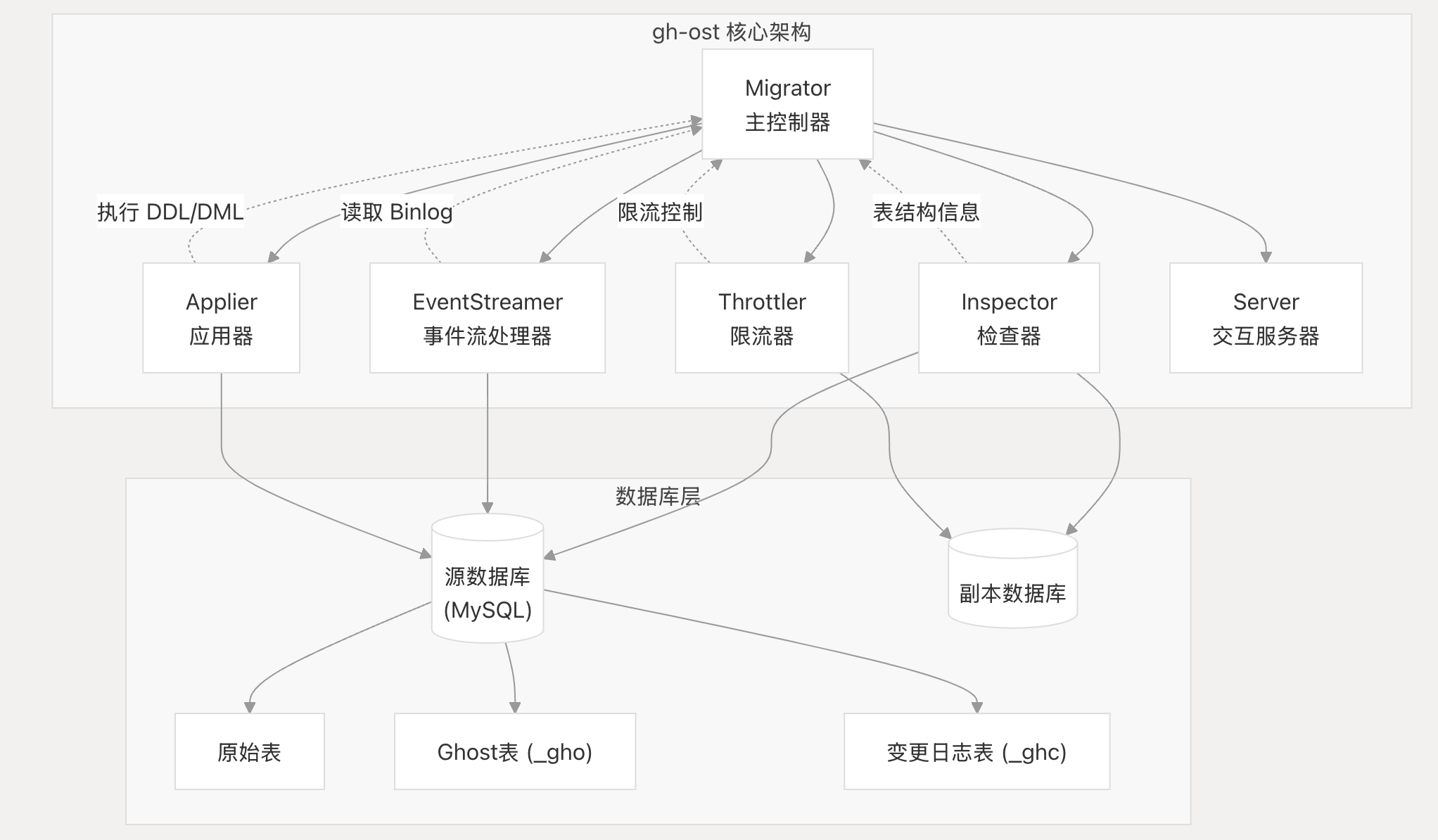
模块职责说明
Migrator(主控制器) 1
- 作为整个迁移过程的核心协调器
- 管理所有其他组件的生命周期
- 控制迁移的各个阶段:初始化、数据复制、切换等
Inspector(检查器) 2
- 连接到 MySQL 服务器(通常是副本)收集信息
- 验证表结构、连接权限和复制状态
- 监控复制延迟
Applier(应用器)
- 管理实际的数据修改操作
- 创建 Ghost 表并应用 schema 变更
- 处理行复制和 binlog 事件的应用
EventStreamer(事件流处理器)
- 读取 MySQL 二进制日志捕获对原始表的持续变更
- 将 binlog 事件转换为可应用的操作
Throttler(限流器)
- 基于服务器负载、复制延迟等指标控制迁移速度
- 确保迁移过程不会对生产系统造成过大影响
工作流程
- 初始化阶段:Migrator 依次初始化各个组件 3
- 验证阶段:Inspector 验证表结构和权限
- 复制阶段:EventStreamer 开始监听 binlog,Applier 分块复制数据
- 同步阶段:持续应用 binlog 事件保持数据同步
- 切换阶段:原子性地交换原始表和 Ghost 表
Notes
这个架构图展示了 gh-ost 的核心设计理念:通过模块化的组件协作实现无触发器的在线 schema 迁移。每个组件都有明确的职责分工,Migrator 作为中央协调器确保整个流程的有序进行。
Wiki pages you might want to explore:
Inspector
Inspector 模块概述
Inspector 是 gh-ost 中负责数据库检查和验证的核心组件,它连接到 MySQL 服务器(通常是副本)来收集模式信息、验证配置并检查复制状态。 1
主要职责
Inspector 模块的核心职责包括:
- 数据库连接和验证
- 表结构检查
- 二进制日志配置验证
- 表行数估算
在迁移流程中的作用
Inspector 在 Migrator 的初始化阶段被调用,负责预检查工作: 12
它还参与原始表和幽灵表的对比分析,确保迁移的兼容性: 13
核心方法
InitDBConnections(): 初始化数据库连接ValidateOriginalTable(): 验证原始表InspectOriginalTable(): 检查原始表结构inspectOriginalAndGhostTables(): 对比原始表和幽灵表
Notes
Inspector 模块是 gh-ost 迁移流程的第一道关卡,确保所有前置条件都满足后才开始实际的迁移操作。它通过连接到副本服务器来避免对主库造成额外负载,同时收集必要的元数据信息供后续迁移步骤使用。
Wiki pages you might want to explore:
func (this *Migrator) initiateInspector() (err error) {
	this.inspector = NewInspector(this.migrationContext)
	// 初始化连接
	if err := this.inspector.InitDBConnections(); err != nil {
		return err
	}
	// 检察源表
	if err := this.inspector.ValidateOriginalTable(); err != nil {
		return err
	}
	// 检查源表列和唯一键、自增值
	if err := this.inspector.InspectOriginalTable(); err != nil {
		return err
	}
	/// ...
	// 检查 slave
	if err := this.inspector.validateLogSlaveUpdates(); err != nil {
		return err
	}
// Inspector reads data from the read-MySQL-server (typically a replica, but can be the master)
// It is used for gaining initial status and structure, and later also follow up on progress and changelog
type Inspector struct {
	connectionConfig    *mysql.ConnectionConfig
	db                  *gosql.DB
	dbVersion           string
	informationSchemaDb *gosql.DB
	migrationContext    *base.MigrationContext
	name                string
}

func NewInspector(migrationContext *base.MigrationContext) *Inspector {
	return &Inspector{
		connectionConfig: migrationContext.InspectorConnectionConfig,
		migrationContext: migrationContext,
		name:             "inspector",
	}
}
检查连接
func (this *Inspector) InitDBConnections() (err error) {
	// DSN -> DB Connection
	// ...
// select @@global.version;select @@global.extra_port;select @@global.port (云 RDS)
	if err := this.validateConnection(); err != nil {
		return err
	}
	this.dbVersion = this.migrationContext.InspectorMySQLVersion

	if !this.migrationContext.AliyunRDS && !this.migrationContext.GoogleCloudPlatform && !this.migrationContext.AzureMySQL {
		if impliedKey, err := mysql.GetInstanceKey(this.db); err != nil {
			return err
		} else {
			this.connectionConfig.ImpliedKey = impliedKey
		}
	}
	if err := this.validateGrants(); err != nil {
		return err
	}
	if err := this.validateBinlogs(); err != nil {
		return err
	}
	if err := this.applyBinlogFormat(); err != nil {
		return err
	}
	this.migrationContext.Log.Infof("Inspector initiated on %+v, version %+v", this.connectionConfig.ImpliedKey, this.migrationContext.InspectorMySQLVersion)
	return nil
}
- 检查链接有效性
version: select @@global.version;
extraPort:select @@global.extra_port;
// AliyunRDS set users port to "NULL", replace it by gh-ost param // GCP set users port to "NULL", replace it by gh-ost param // Azure MySQL set users port to a different value by design, replace it by gh-ost para var port int if migrationContext.AliyunRDS || migrationContext.GoogleCloudPlatform || migrationContext.AzureMySQL { port = connectionConfig.Key.Port } else { portQuery := `select @@global.port` if err := db.QueryRow(portQuery).Scan(&port); err != nil { return "", err } } - 检查权限
show /* gh-ost */ grants for current_user() - 检查 binlog
select /* gh-ost */ @@global.log_bin, @@global.binlog_format
检查源表
func (this *Inspector) ValidateOriginalTable() (err error) {
	if err := this.validateTable(); err != nil {
		return err
	}
	if err := this.validateTableForeignKeys(this.migrationContext.DiscardForeignKeys); err != nil {
		return err
	}
	if err := this.validateTableTriggers(); err != nil {
		return err
	}
	if err := this.estimateTableRowsViaExplain(); err != nil {
		return err
	}
	return nil
}
validateTable show /* gh-ost */ table status from %s like '%s'
estimateTableRow explain select /* gh-ost */ * from %s.%s where 1=1
检查源表列和唯一键、自增值
EventsStreamer 概述
EventsStreamer 是 gh-ost 架构中负责读取 MySQL 二进制日志(binlog)并流式传输事件的核心组件 。它连接到 MySQL 作为副本来读取二进制日志,监听对被迁移表的数据操作,并将这些事件通知给感兴趣的监听器 。
主要职责
- 连接 MySQL binlog:作为副本连接到 MySQL 服务器读取二进制日志
- 事件流式传输:持续流式传输 binlog 事件
- 监听器通知:将 DML 操作(INSERT、UPDATE、DELETE)事件通知给注册的监听器
- 故障重连:处理连接失败时的重连逻辑
核心方法
初始化和配置
InitDBConnections():建立数据库连接 1initBinlogReader():设置二进制日志读取器readCurrentBinlogCoordinates():读取当前 binlog 位置
事件处理
在迁移过程中的作用
在 Migrator 中,EventsStreamer 通过 initiateStreaming() 方法被初始化 4 。该方法:
清理过程
在迁移结束时,EventsStreamer 会被正确清理。在 finalCleanup() 中调用 eventsStreamer.Close() 10 ,在 teardown() 中调用 eventsStreamer.Teardown() 11 。
Notes
EventsStreamer 是 gh-ost 实现在线迁移的关键组件,它确保在数据复制过程中不会丢失对原表的任何更改。通过监听 binlog 事件,它能够将对原表的实时更改应用到 ghost 表上,保证数据一致性。
Wiki pages you might want to explore:
// initiateStreaming begins streaming of binary log events and registers listeners for such events
func (this *Migrator) initiateStreaming() error {
	this.eventsStreamer = NewEventsStreamer(this.migrationContext)
	if err := this.eventsStreamer.InitDBConnections(); err != nil {
		return err
	}
	this.eventsStreamer.AddListener(
		false,
		this.migrationContext.DatabaseName,
		this.migrationContext.GetChangelogTableName(),
		func(dmlEvent *binlog.BinlogDMLEvent) error {
			return this.onChangelogEvent(dmlEvent)
		},
	)

	go func() {
		this.migrationContext.Log.Debugf("Beginning streaming")
		err := this.eventsStreamer.StreamEvents(this.canStopStreaming)
		if err != nil {
			this.migrationContext.PanicAbort <- err
		}
		this.migrationContext.Log.Debugf("Done streaming")
	}()

	go func() {
		ticker := time.NewTicker(time.Second)
		defer ticker.Stop()
		for range ticker.C {
			if atomic.LoadInt64(&this.finishedMigrating) > 0 {
				return
			}
			this.migrationContext.SetRecentBinlogCoordinates(*this.eventsStreamer.GetCurrentBinlogCoordinates())
		}
	}()
	return nil
}
- NewEventsStreamer
- AddListener
- go StreamEvents
Applier 模块概述
Applier 是 gh-ost 迁移系统中负责执行数据库写操作的核心组件 1 。它连接到目标数据库服务器,执行模式变更和行修改操作。
主要职责
Applier 模块的核心职责包括:
- 创建和修改 Ghost 表:创建具有原始模式的 ghost 表,并应用 ALTER 语句
- 创建 Changelog 表:用于跟踪迁移状态和心跳
- 构建和执行 DML 查询:处理 INSERT、UPDATE、DELETE 操作
- 执行最终表交换:在迁移完成时进行原子性的表切换
- 处理 Cut-over 操作:管理迁移的关键切换阶段
- 写入 Changelog 条目:记录迁移进度和状态
在迁移流程中的作用
在 Migrator 的初始化过程中,Applier 通过 initiateApplier() 方法被创建和配置 2 。该方法执行以下关键步骤:
与其他组件的交互
Applier 与其他核心组件紧密协作:
- 与 Migrator 的关系:作为 Migrator 结构体的成员,接受 Migrator 的协调和控制 1
- 与 EventsStreamer 的协作:接收来自 binlog 流的 DML 事件并应用到 ghost 表
- 与 Throttler 的配合:在执行写操作时受到节流控制,确保不会对生产系统造成过大影响
执行写操作
在迁移的数据复制阶段,Applier 通过 executeWriteFuncs() 方法处理写操作 8 。该方法优先处理事件队列中的 DML 操作,然后处理行复制操作 9 。
Cut-over 操作
Applier 在迁移的最终阶段执行关键的 cut-over 操作,包括原子性表重命名 10 和两步式表交换 11 ,确保迁移过程中的数据一致性。
Notes
Applier 模块是 gh-ost 实现在线模式迁移的核心执行组件,它通过精心设计的操作序列和与其他组件的协调,确保了迁移过程的安全性和数据完整性。该模块的设计体现了 gh-ost 对生产环境友好的核心理念。
Wiki pages you might want to explore:
func (this *Migrator) initiateApplier() error {
	this.applier = NewApplier(this.migrationContext)
	if err := this.applier.InitDBConnections(); err != nil {
		return err
	}
	if err := this.applier.ValidateOrDropExistingTables(); err != nil {
		return err
	}
	if err := this.applier.CreateChangelogTable(); err != nil {
		this.migrationContext.Log.Errorf("Unable to create changelog table, see further error details. Perhaps a previous migration failed without dropping the table? OR is there a running migration? Bailing out")
		return err
	}
	if err := this.applier.CreateGhostTable(); err != nil {
		this.migrationContext.Log.Errorf("Unable to create ghost table, see further error details. Perhaps a previous migration failed without dropping the table? Bailing out")
		return err
	}

	if err := this.applier.AlterGhost(); err != nil {
		this.migrationContext.Log.Errorf("Unable to ALTER ghost table, see further error details. Bailing out")
		return err
	}

	if this.migrationContext.OriginalTableAutoIncrement > 0 && !this.parser.IsAutoIncrementDefined() {
		// Original table has AUTO_INCREMENT value and the -alter statement does not indicate any override,
		// so we should copy AUTO_INCREMENT value onto our ghost table.
		if err := this.applier.AlterGhostAutoIncrement(); err != nil {
			this.migrationContext.Log.Errorf("Unable to ALTER ghost table AUTO_INCREMENT value, see further error details. Bailing out")
			return err
		}
	}
	this.applier.WriteChangelogState(string(GhostTableMigrated))
	if err := this.applier.StateMetadataLockInstrument(); err != nil {
		this.migrationContext.Log.Errorf("Unable to enable metadata lock instrument, see further error details. Bailing out")
		return err
	}
	go this.applier.InitiateHeartbeat()
	return nil
}
- NewApplier
- InitDBConnections
- ValidateOrDropExistingTables (表 gho )
- CreateChangelogTable (表 ghc)
- CreateGhostTable (表 gho)
- AlterGhost
- AlterGhostAutoIncrement
- WriteChangelogState
- this.applier.InitiateHeartbeat()
Server
Server 模块是 gh-ost 中提供交互式命令接口的组件,允许操作员在迁移过程中控制和监控迁移状态 。
Server 模块的核心功能
Server 模块在 Migrator 中通过 initiateServer() 方法初始化 1 。该模块支持两种连接方式:
- Unix Socket 连接 - 通过
BindSocketFile()创建本地套接字文件 - TCP 端口连接 - 通过
BindTCPPort()绑定 TCP 端口以支持远程访问
主要职责
Server 模块的主要职责包括:
- 提供迁移过程中的交互式控制
- 通过 Unix socket 或 TCP 端口接受命令
- 显示迁移状态信息
- 支持节流控制命令(throttle/unthrottle)
- 提供紧急终止功能(panic 命令)
在迁移流程中的位置
Server 在迁移的验证阶段完成后启动 2 ,并在迁移完成后通过 defer this.server.RemoveSocketFile() 清理套接字文件。
状态显示功能
Server 模块还负责显示详细的迁移状态信息,包括:
- 源表和目标表信息
- 连接配置详情
- 迁移参数(chunk-size、max-lag-millis 等)
- 节流配置和标志文件状态 3
Notes
Server 模块是 gh-ost 架构中七个核心组件之一,与其他组件(Migrator、Inspector、Applier、EventsStreamer、Throttler、HooksExecutor)协同工作。它通过共享的 MigrationContext 获取迁移状态信息,为用户提供实时的迁移监控和控制能力。
Wiki pages you might want to explore:
// initiateServer begins listening on unix socket/tcp for incoming interactive commands
func (this *Migrator) initiateServer() (err error) {
	var f printStatusFunc = func(rule PrintStatusRule, writer io.Writer) {
		this.printStatus(rule, writer)
	}
	this.server = NewServer(this.migrationContext, this.hooksExecutor, f)
	if err := this.server.BindSocketFile(); err != nil {
		return err
	}
	if err := this.server.BindTCPPort(); err != nil {
		return err
	}

	go this.server.Serve()
	return nil
}
Throttler
Throttler 是 gh-ost 中负责控制迁移速度的核心组件,用于确保数据库迁移过程不会对生产系统造成过大影响。 1 它作为 Migrator 的一个重要组成部分,监控各种系统指标并在必要时暂停或减缓迁移操作。
初始化和启动
Throttler 在迁移过程中通过 initiateThrottler 方法初始化: 2
该方法创建 Throttler 实例并启动两个关键的 goroutine:
initiateThrottlerCollection:收集节流指标initiateThrottlerChecks:执行节流检查
系统会等待三种类型的初始指标收集完成:复制延迟、HTTP 状态和其他通用指标。
节流控制机制
Throttler 在数据写入过程中发挥关键作用。在 executeWriteFuncs 方法中,每次执行写操作前都会调用 throttler.throttle(nil): 3
这确保了在处理事件队列和行复制操作之前,系统会检查是否需要节流。
切换阶段的节流
在关键的表切换(cut-over)阶段,Throttler 也起到重要作用。在 cutOver 方法中,系统会在交换表之前进行节流检查: 4
这确保了在执行最关键的表交换操作之前,系统处于稳定状态。
资源清理
当迁移完成或需要清理时,Throttler 会在 teardown 方法中被正确关闭: 5
Notes
Throttler 是 gh-ost 安全迁移机制的核心组件,通过监控复制延迟、系统负载、HTTP 端点状态等多种指标来动态控制迁移速度。它与 Migrator 的其他组件(Inspector、Applier、EventsStreamer)紧密协作,确保整个迁移过程的稳定性和安全性。具体的节流逻辑实现位于单独的 throttler.go 文件中,但从 migrator.go 中可以看到它在整个迁移流程中的关键作用点。
Wiki pages you might want to explore:
Hook 系统概述
gh-ost 的 hook 系统允许用户在迁移过程的关键节点执行自定义脚本,通过 HooksExecutor 组件实现。 1
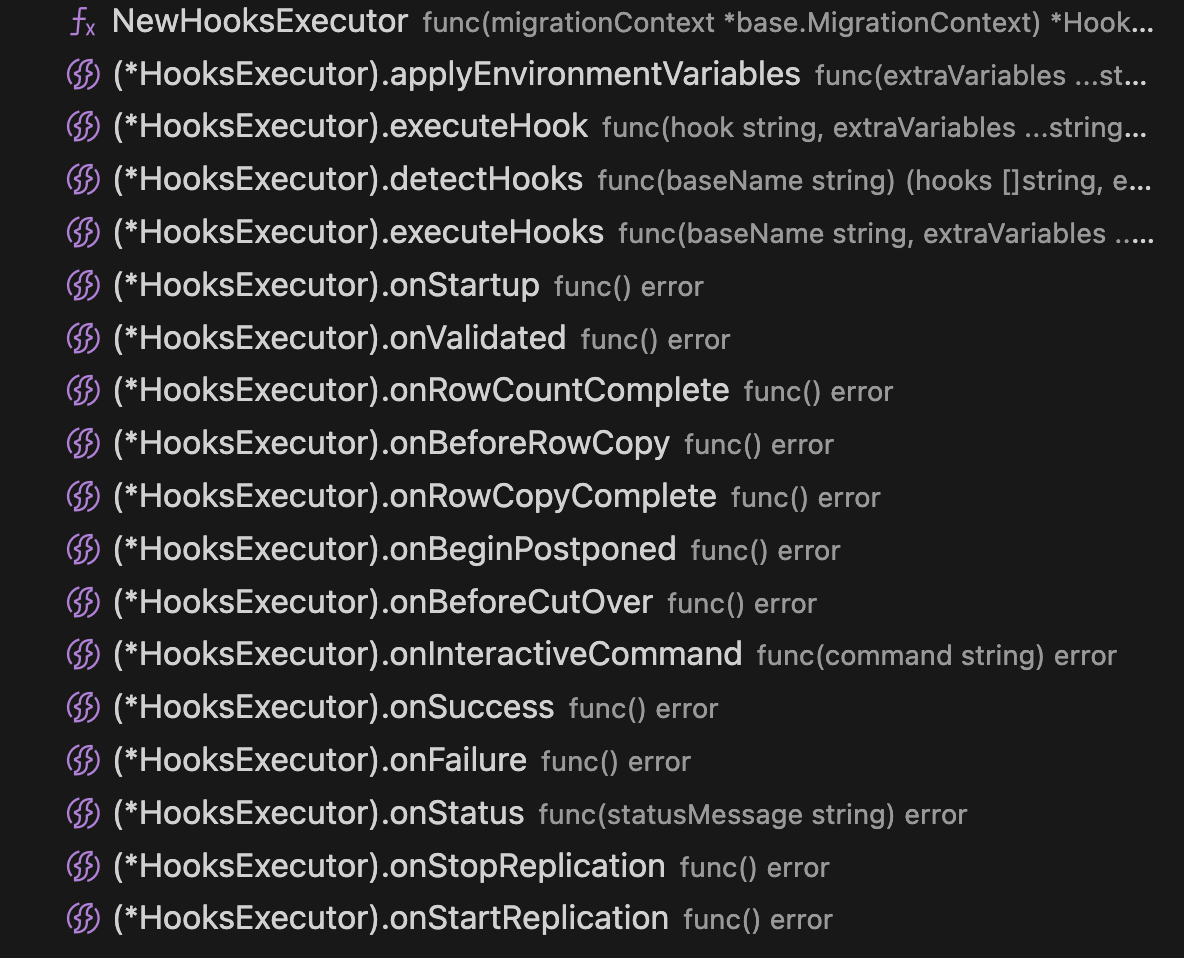
Hook 执行点
gh-ost 在以下关键时刻执行 hook:
- startup - 迁移开始时执行 2
- validated - 表和配置验证完成后执行 3
- before-row-copy - 行复制阶段开始前执行 4
- row-copy-complete - 所有行复制完成后执行 5
- before-cut-over - 最终表切换前执行 6
- success - 迁移成功完成时执行 7
- failure - 迁移失败时执行 7
Hook 的作用
Hook 系统使用户能够:
- 在迁移的关键节点执行自定义逻辑
- 集成外部监控和通知系统
- 实现自定义的验证和检查
- 处理迁移过程中的特殊需求
实现方式
HooksExecutor 在 Migrator 初始化时创建,并在整个迁移过程中被调用来执行相应的 hook 脚本。 1 Hook 的执行与迁移的主要流程紧密集成,确保在正确的时机触发用户定义的操作。
Notes
Hook 系统是 gh-ost 提供的扩展机制,让用户可以在不修改核心代码的情况下定制迁移行为。每个 hook 都对应迁移过程中的特定阶段,为用户提供了充分的控制和监控能力。
Wiki pages you might want to explore:
参考 https://blog.csdn.net/qq_33997198/article/details/120181651